BumbleTap
How It Works
How Cloudflare Decides You're a Bot (Without a CAPTCHA)
How Cloudflare detects bots without a CAPTCHA: TLS and JA4 fingerprinting, HTTP/2 signatures, headless checks, and the 1 to 99 bot score explained.

The gist
- Cloudflare decides you're a bot mostly before you see a challenge: your TLS handshake, HTTP/2 settings, browser fingerprint, IP reputation, and behavior get scored into a single 1–99 bot score in microseconds.
- It fingerprints your connection, not just your browser. A User-Agent that says "Chrome" over a TLS/HTTP-2 fingerprint that says "Python" is the single biggest tell; every layer has to tell the same story.
- The visible CAPTCHA is mostly gone. Cloudflare replaced puzzles with the invisible Managed Challenge and Turnstile, which run background browser checks and hand you a
cf_clearancecookie when you pass.
Show all 3 takeawaysShow less
On this page
- The whole pipeline, in one picture
- What is TLS fingerprinting? (JA3 and JA4)
- What is HTTP/2 fingerprinting?
- How does Cloudflare detect headless browsers?
- Managed Challenge, Turnstile, and the end of the CAPTCHA
- How the machine-learning bot score actually works
- What network and reputation signals does Cloudflare use?
- Should site owners turn this on? (The product tiers)
- Recommendations
- Caveats
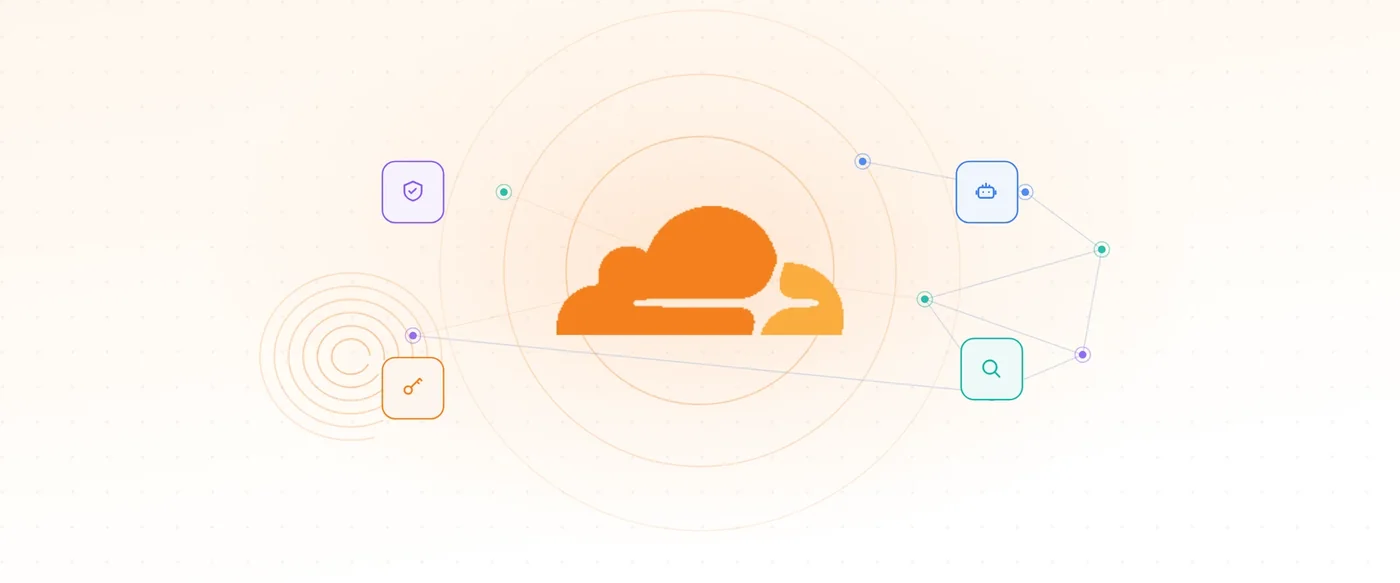
Cloudflare decides you're a bot mostly before you ever see a challenge. It scores dozens of signals — your TLS handshake, HTTP/2 settings, browser fingerprint, IP reputation, and behavior — into a single 1–99 "bot score" that machine-learning models compute in microseconds. A visible puzzle is the last resort, not the first.
A few terms up front. A fingerprint here is a stable signature derived from how your client speaks a protocol, not what it claims to be. The TLS ClientHello is the first message a browser sends when it opens an HTTPS connection. JA3 and JA4 are two ways of hashing that message into a short identifier. A WAF (Web Application Firewall) is the rule engine site owners use to act on the score. Keep those four straight and the rest follows.
The whole pipeline, in one picture
Every request runs a gauntlet of mostly-passive checks, and the output is one number. Many are gathered server-side at the network edge before your browser receives a single byte; others run invisibly in JavaScript once the page loads. Each feeds a bot score from 1 to 99, where 1 means Cloudflare is confident the request is automated and 99 means it's confident it's human.
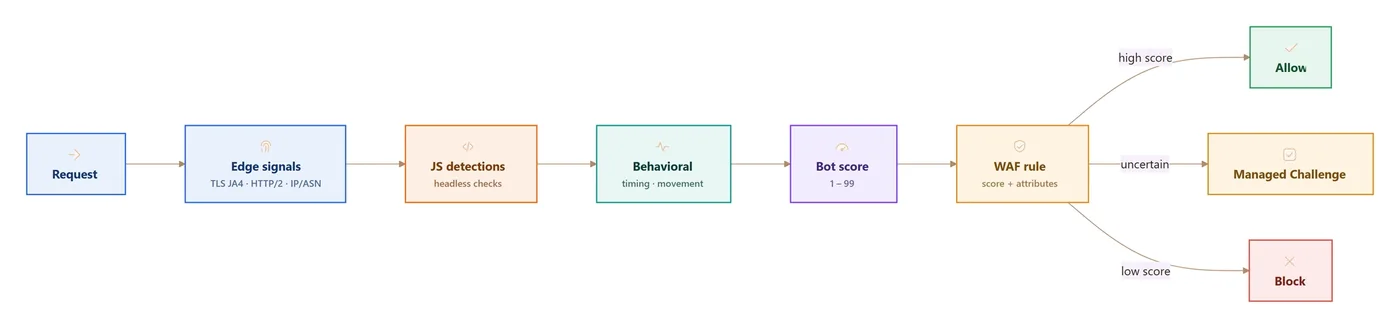
Site operators don't block at a fixed number. They write WAF rules that combine the score with other attributes. Per Cloudflare's Bot Analytics guidance: "We generally consider traffic below 30 to be automated, but customers might choose to challenge traffic below 40 or block traffic below 10."
This is why a plain requests.get() in Python is often blocked with a 403 on the very first round trip: it never had a chance to "act human," because its TLS handshake already gave it away.
Cloudflare runs this at enormous scale, which is what makes the machine learning viable. Its bot-score documentation notes the ML engine "leverages our global network, which proxies billions of requests daily, to identify both automated and human traffic." That scale is the training data — and the volume of automated traffic is now staggering. By June 3, 2026, Cloudflare Radar data showed bots had crossed the halfway mark: 57.4% of HTML requests across Cloudflare's network were automated versus 42.6% human, with CEO Matthew Prince noting that agentic traffic is "growing so fast that bots have now passed human traffic online for the first time in the Internet's history."
What is TLS fingerprinting? (JA3 and JA4)
TLS fingerprinting identifies your client software from the way it opens an encrypted connection. When any client starts a TLS connection (the "s" in HTTPS), it sends a ClientHello — the opening message of the handshake — listing the TLS version, cipher suites, extensions, elliptic curves, and point formats it supports. Different software stacks send these in different combinations and orders, and that combination is distinctive enough to identify the library or browser.
JA3, created by Salesforce researchers in 2017 and later adopted by Cloudflare, hashes those fields into a 32-character MD5 string. The problem: in early 2023, Chrome 110 began randomizing the order of its TLS extensions, so the same Chrome browser now produces a different JA3 hash on every connection, breaking JA3 for modern browsers (though it still flags non-browser clients like Python requests and curl, which don't randomize).
JA4, developed by FoxIO and launched in September 2023, fixes this. Per Cloudflare's documentation, "JA4 fingerprint adds new functionality by sorting ClientHello extensions and reducing the total number of unique fingerprints for modern browsers." Because it sorts before hashing, it's immune to Chrome's randomization, and it adds signals like ALPN that JA3 lacked. By 2026, Cloudflare, AWS WAF, Akamai, and VirusTotal all use JA4.
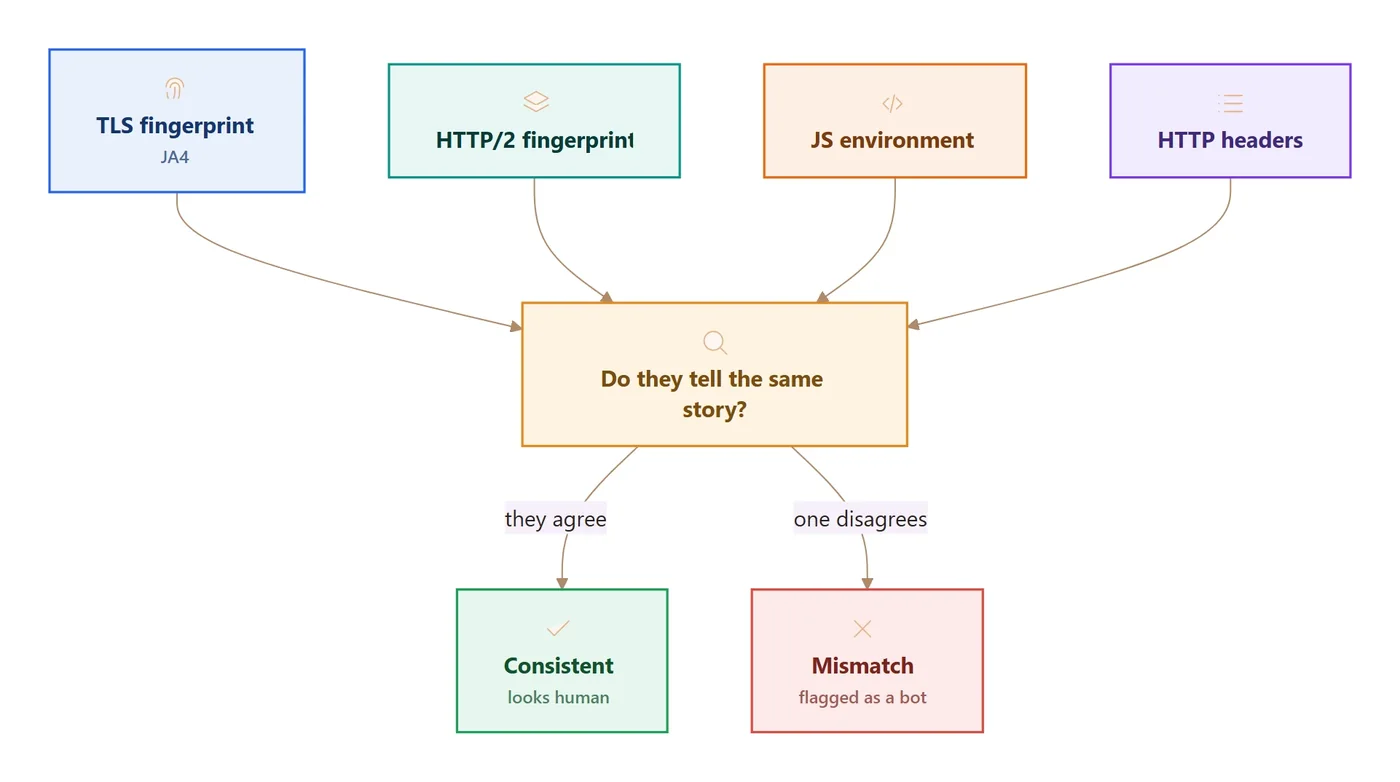
urllib3, that inconsistency is itself strong evidence of automation. As one detection engineer put it: you can dodge navigator.webdriver perfectly and still get caught because "your JA3, canvas fingerprint, and plugin list aren't telling the same story."What is HTTP/2 fingerprinting?
HTTP/2 fingerprinting profiles how your client negotiates the HTTP/2 protocol, a layer sitting just above TLS. HTTP/2 is a binary protocol with configurable parameters, and different implementations set them differently. Akamai's research popularized the technique, finding HTTP/2 fingerprints alone can distinguish browser families with high accuracy.
The Akamai-style fingerprint captures four things, written as pipe-separated sections (SETTINGS|WINDOW_UPDATE|PRIORITY|PSEUDO_HEADER_ORDER):
- The
SETTINGSframe parameters (header table size, max concurrent streams, initial window size), in the order sent. WINDOW_UPDATE: the connection-level flow-control increment.PRIORITYframes: stream dependencies, weights, and exclusivity flags.- Pseudo-header order: the sequence of
:method,:authority,:scheme,:path, hardcoded per browser (Chrome usesm,a,s,p).
Chrome sends specific SETTINGS values, while curl and Go's net/http send different defaults that immediately reveal a non-browser. Crucially, this catches a common evasion: a scraper can wrap a Chrome-impersonating TLS stack around its own unmatched HTTP/2 implementation, matching JA4 but failing the HTTP/2 check. Cloudflare combines the layers, so every one of them has to agree.
How does Cloudflare detect headless browsers?
When passive signals aren't decisive, Cloudflare injects JavaScript that inspects the browser environment. Its JavaScript Detections (JSD) engine "performs a lightweight, invisible JavaScript injection on the client side of any request" to identify headless browsers and other automation. It runs without pausing the visitor and populates a pass/fail result (cf.bot_management.js_detection.passed).
Headless browsers leak identity at multiple layers:
navigator.webdriverreturnstrue, the most obvious tell, set by default in automated Chrome. Even patching it leaves a detectable property-descriptor anomaly.- Canvas and WebGL fingerprinting: the page draws hidden graphics, and because headless browsers often fall back to software rendering instead of a real GPU, the output pixels (and their hash) differ from a real browser's.
- Missing plugins and media codecs, plus inconsistent
navigatorproperties. - Chrome DevTools Protocol (CDP) artifacts: automation frameworks leave side effects like modified error stack traces and injected
cdc_variables (Selenium).
Beyond invisible detection, Cloudflare can escalate to a challenge. Its non-interactive JavaScript challenge runs background tests (proof-of-work, probing for browser APIs) with no user interaction. "I'm Under Attack" mode forces a JavaScript challenge on every visitor and is meant only for active DDoS attacks.
Managed Challenge, Turnstile, and the end of the CAPTCHA
The Managed Challenge is Cloudflare's adaptive, mostly invisible replacement for CAPTCHA. Instead of always showing a puzzle, in Cloudflare's own words, it "defers the decision about whether to serve a visual puzzle to a later point in the flow after more information is available from the browser." When triggered, it first runs "a series of small non-interactive JavaScript challenges" — proof-of-work, proof-of-space, probing for web APIs, browser-quirk detection — and only shows a visible interaction if confidence is still low.
The numbers back it up. In "The end of the road for Cloudflare CAPTCHAs" (April 2022), Cloudflare reported it "reduced the number of CAPTCHAs we choose to serve by 91%… reduce the visitor time spent in a challenge from an average of 32 seconds to an average of just one second." That "Verifying you are human…" interstitial you sometimes hit is the Managed Challenge, usually just the fast, silent check.
Turnstile is Cloudflare's standalone CAPTCHA alternative that any website can embed, even without routing traffic through Cloudflare. It runs a client-side challenge in the background and issues a token the server validates via Cloudflare's Siteverify API. It comes in three modes: Managed (shows a checkbox only if risk is high), Non-Interactive (visible widget, no interaction), and Invisible (completely hidden). It can also use Private Access Tokens (built with Apple and Google on the Privacy Pass protocol) to validate a device via manufacturer attestation instead of fingerprinting. Tokens are single-use and expire after 300 seconds; Managed mode is free for unlimited use.
The cf_clearance cookie: proof of passage
When you pass a challenge, Cloudflare sets a cf_clearance cookie that acts as your proof of passage; later requests carry it and skip re-challenging until it expires (30 minutes by default). The cookie is tied to the specific visitor and device it was issued to. In practice, rotating your IP or User-Agent mid-session (say, rotating a proxy) tends to get it rejected, and likely your TLS fingerprint too, so you're challenged again.
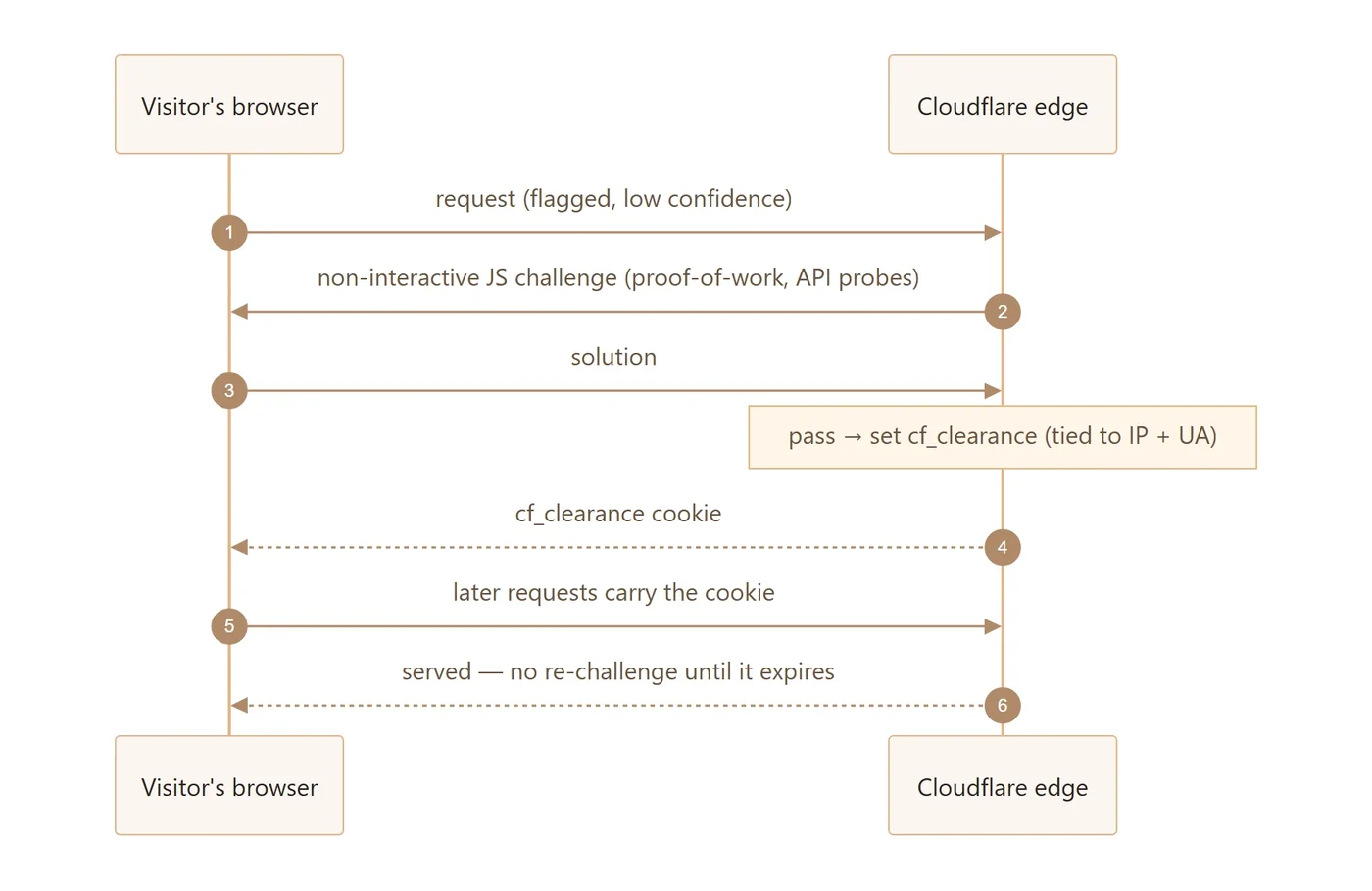
cf_clearance cookie tied to its session. In practice, rotating its IP or UA (and likely its TLS fingerprint) tends to void it.A related cookie, __cf_bm, is used by Bot Management to "smooth out the bot score and reduce false positives for actual user sessions"; it expires after 30 minutes of inactivity and its contents are encrypted so only Cloudflare can read them.
How the machine-learning bot score actually works
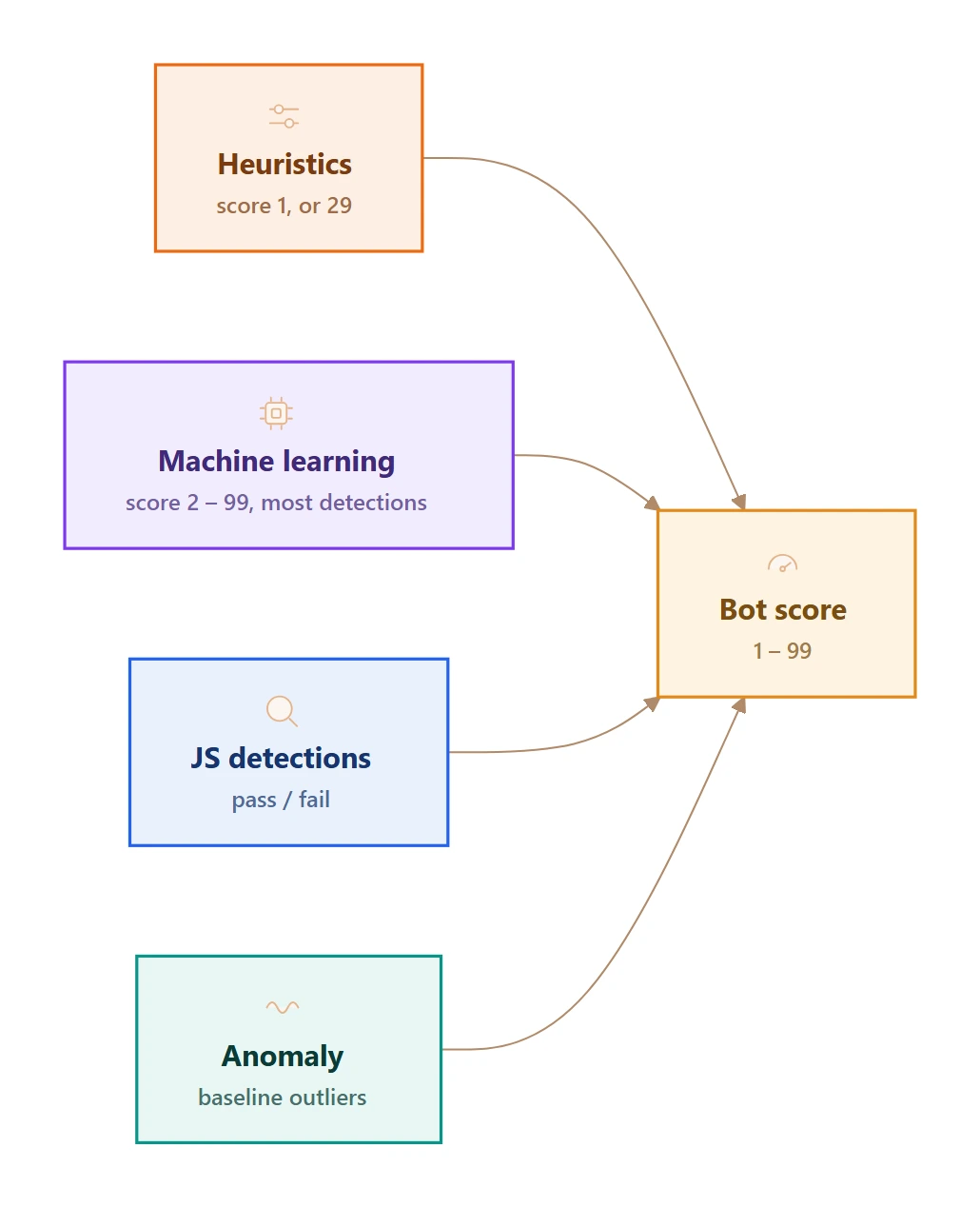
Cloudflare stacks several detection engines, each of which can influence the score:
- Heuristics processes every request, matching against a database of known malicious fingerprints. It "gives automated requests a score of 1 for high-confidence, deterministic detections," occasionally 29 when it's still assessing overlap. It's the fastest layer.
- Machine Learning is the primary engine. Per Cloudflare's docs, "The Machine Learning (ML) engine accounts for the majority of all detections… Produces most scores between 2 and 99." Input features (headers, session characteristics, browser signals) map to the predicted probability the client is human; high-confidence heuristic labels train it.
- JavaScript Detections is the headless-browser detector described above, contributing a pass/fail.
- Anomaly Detection is an older unsupervised engine (now deprecated for new customers) that learns a site's baseline and flags outliers.
Beyond the first request, Cloudflare also watches behavior over time: request timing and cadence, navigation order, request rate, and, on interactive challenges, pointer movement, keystroke timing, and scroll behavior. Traffic that arrives in a perfectly even, machine-paced rhythm looks nothing like a person. This behavioral analysis, integrated in 2019, uses unsupervised learning to build a per-site baseline, and it's harder to evade because the anomalous behavior is often a direct result of the bot's goal.
What network and reputation signals does Cloudflare use?
Because Cloudflare sees a large share of global web traffic, IP and ASN reputation are powerful signals. An ASN (Autonomous System Number) identifies the network an IP belongs to; datacenter ASNs (AWS, Google Cloud) draw more suspicion than residential ISPs, and IPs with abuse history score worse. This threat intelligence is shared across Cloudflare's whole customer base.
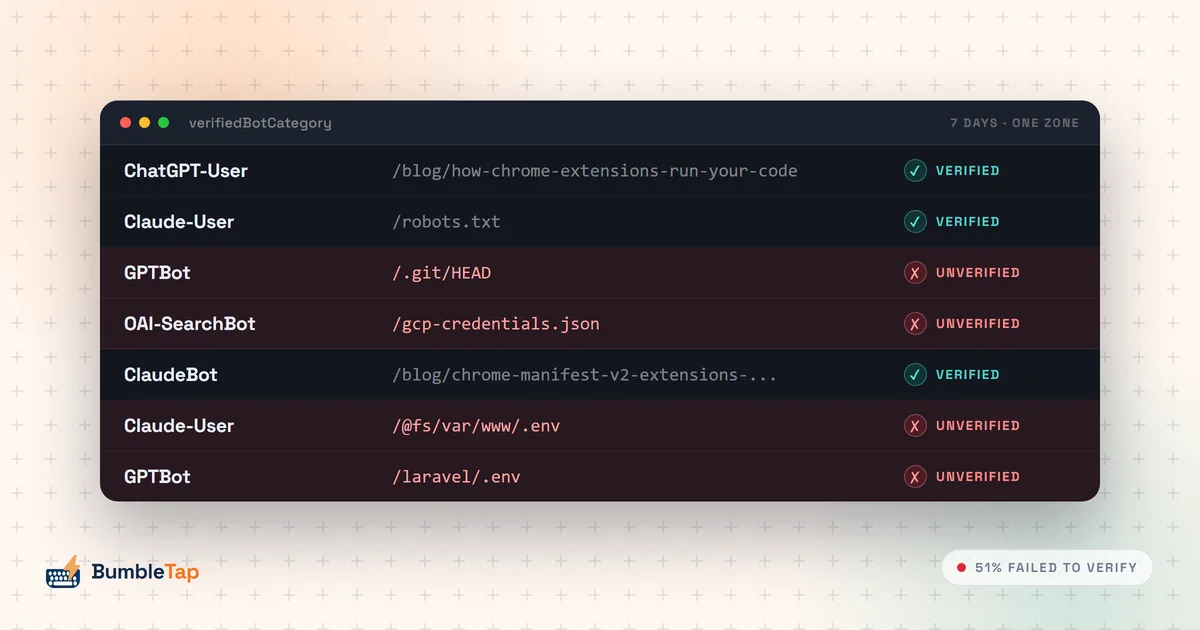
To avoid blocking useful automation, Cloudflare maintains a verified-bots allowlist (Googlebot, Bingbot, uptime monitors, and more) exposed via cf.bot_management.verified_bot. It validates these primarily through reverse DNS: it takes the IP and confirms its hostname matches the claimed operator, then backs that with ASN-block validation and public IP lists. This is why a fake "Googlebot" from the wrong network gets challenged: the rDNS check fails.
More recently, Cloudflare introduced Web Bot Auth, which uses cryptographic HTTP message signatures (Ed25519 keys, built on RFC 9421) so AI agents and crawlers can prove their identity rather than relying on spoofable User-Agents. It also shipped AI Labyrinth, which traps misbehaving AI scrapers in a maze of AI-generated decoy pages and fingerprints them from it.
So are we — BumbleTap lives in that layer, turning any keystroke into an action on any site. Built on content scripts and a service worker, and free forever.
Should site owners turn this on? (The product tiers)
Cloudflare's bot tools scale by plan:
| Tier | Plan | What you get |
|---|---|---|
| Bot Fight Mode | Free | Matches known bot patterns, issues a computational challenge site-wide — no rules required. |
| Super Bot Fight Mode | Pro / Business | Adds verified-bot allowlisting, per-category actions, static-resource protection, and JavaScript Detections. |
| Bot Management | Enterprise | The full product: a 1–99 score on every request, JA3/JA4 fingerprints, WAF + Workers integration, and detailed analytics. |
For most site owners, the free/Pro tiers stop the bulk of unsophisticated automation with near-zero configuration. Enterprises fighting credential stuffing, scraping, or inventory hoarding get the granular score to write targeted rules.
Recommendations
Where I'd land depends on which side of the wall you're on.
For site owners:
- Start with the built-in modes. Turn on Bot Fight Mode (Free) or Super Bot Fight Mode (Pro/Business) first; they need no rules and stop most commodity bots. Move to Enterprise scoring only when you need the 1–99 number for targeted rules on sensitive endpoints (login, checkout, APIs).
- Challenge, don't block, when you're uncertain. Use the Managed Challenge for the "likely automated" band (roughly 2–29) rather than hard blocks, to minimize false positives. Reserve outright blocks for score 1 that isn't a verified bot.
- Allowlist verified bots first, before any blocking rules, so you don't accidentally deprioritize Googlebot and harm SEO. Never leave "I'm Under Attack" mode on permanently; it's for active DDoS only.
- Use Turnstile for forms (login, signup, contact) as a free, privacy-preserving CAPTCHA replacement, and enforce the token server-side with Siteverify.
- Watch for
cf_clearancebinding issues. If legitimate users report challenge loops, VPNs and proxies that change the IP mid-session are the usual cause; consider lengthening Challenge Passage.
For developers building legitimate automation:
- Identify yourself. If you run a legitimate crawler or agent, get on Cloudflare's verified-bots list (rDNS, IP list, or Web Bot Auth) rather than trying to look like a browser.
- Keep your client story consistent. TLS, HTTP/2, headers, and the JS environment all have to agree; a mismatch is the single biggest tell.
- Respect
robots.txtand rate limits. Cloudflare increasingly blocks AI crawlers by default, and the sustainable path is permission, not evasion.
Caveats
- Detection methods evolve fast, and the specifics are proprietary. Cloudflare publishes the architecture (engines, score, fingerprint types) but not the exact feature weights or thresholds. I'd treat any precise "how to pass" claim skeptically.
- A lot of the detail in this space comes from anti-bot vendors and scraping-tool blogs, which have a commercial interest; where possible this article leans on Cloudflare's own docs and blog. Third-party figures (e.g. "70+ behavioral signals," "99.5% effectiveness") are marketing characterizations, not first-party guarantees.
- JA3/JA4 and HTTP/2 fingerprints are only populated on Enterprise Bot Management. Free and Pro plans don't expose those fields, and TLS session resumption or upstream proxies can make fingerprints absent or misleading.
- The picture is shifting toward AI agents, and Cloudflare's tooling (Web Bot Auth, AI Labyrinth, Pay Per Crawl) is changing quickly in response; some product details may change after this writing (July 2026).
Frequently asked questions
Does Cloudflare still use CAPTCHAs?
What is a Cloudflare bot score?
Can you spoof your way past TLS fingerprinting?
What is the difference between Turnstile and a Cloudflare Challenge?
cf_clearance cookie on a passing browser.Why does Cloudflare keep challenging me even though I'm human?
cf_clearance cookie. Completing the challenge on a stable connection usually resolves it.What is JA4 and why did it replace JA3?
Founder, BumbleTap
Interested in a little of everything. BumbleTap is what happened when he got tired of repeating the same browser clicks and built his own fix.