 BumbleTap
Free QR code generator.
Make a QR code for a link, Wi-Fi network, email or text message and download it as PNG or SVG, right in your browser, with no account.
Built and maintained by Shahzeb UmerUpdated
Generator
What to encode
You can leave off https://. It’s added so the scan opens a browser.
Preview
Live- Version
- 2
- Modules
- 25×25
- Data
- 21 B
Made in your browser, logo included. Nothing you type or upload is sent anywhere.
QMaking these often? With BumbleTap, press Q on any page.Appearance
Logo
Phone cameras read shaped corners fine, but some older scanners only find square ones. If you can’t reprint it, scan it first, or keep the frame on Square.
- Free, no watermark
- No account
- Codes never expire
- Made in your browser
Skip the form
Press Q for a QR code of any page.
The Create QR Code for Any Page blueprint puts this tool on one key, on every site you visit.
If you send links from your laptop to your phone often, opening this page each time is three steps too many. With the blueprint it happens in place:
- Press QQ to show a code for the page you’re on.
- Select some text first to encode that instead.
- Copy it or save a PNG, then press EscEsc to close.
What goes in a code
A QR code is short text with a prefix.
The prefix tells a phone camera what to offer: open a page, join a network, or start a message.
Link
https://bumbletap.comOpens the page in a browser.
Text
Locker 14, code 2291Shows the text as it is.
Wi-Fi
WIFI:T:WPA;S:Home;P:pa\;ss;;Offers to join the network.
Email
mailto:hi@example.com?subject=HiStarts an email, filled in.
SMS
SMSTO:+15550109999:On my wayStarts a text message.
The tabs above write these prefixes for you, with the escaping each format needs. That’s where hand-made codes usually go wrong: an unescaped semicolon in a Wi-Fi password cuts off the rest of it. The formats come from ZXing’s Barcode Contents, the reference phone cameras ended up following. It escapes \ ; , : " with a backslash.
Printing
Most scan failures are physical.
Four things cause nearly all of them.
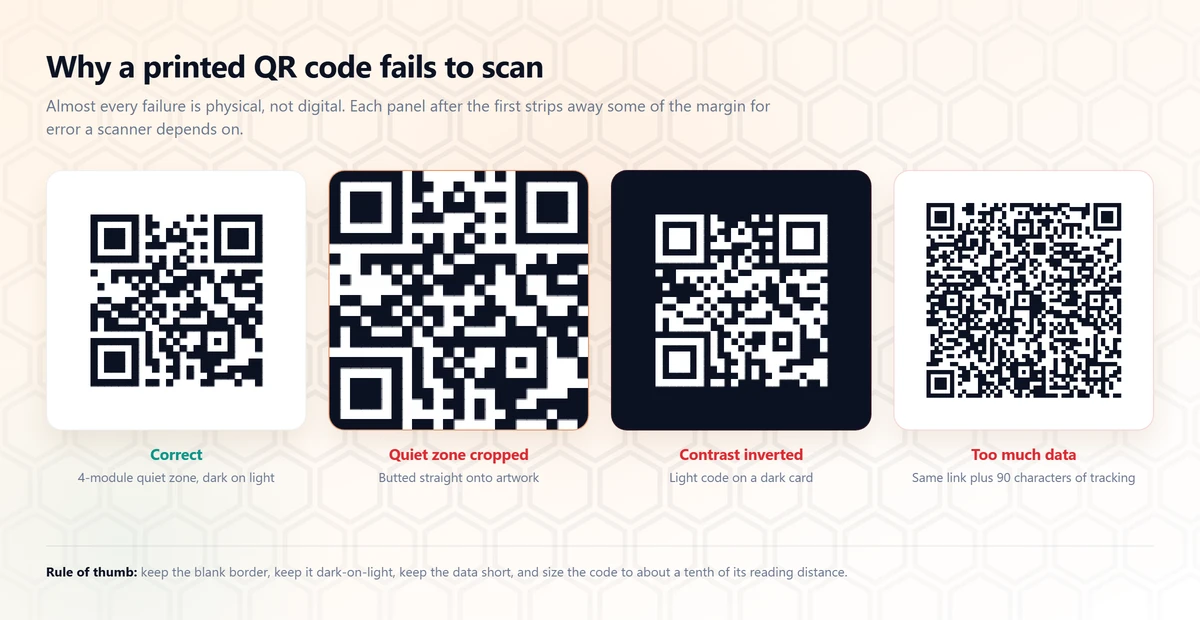
Keep the quiet zone.
The blank border is part of the code, not padding. ISO/IEC 18004 asks for four modules of it. Cropping tight to the pattern is the most common reason a printed code won’t read. Every download from this page includes it.
Keep it dark on light.
Scanners expect dark modules on a light background. A light code on a dark card fails on a surprising number of phones. For a dark design, put a light panel behind the code.
Keep the data short.
Every extra character makes the code denser and the modules smaller. A link with 40 characters of tracking tags is harder to scan than the same link without them.
Size it for the distance.
Make the code about a tenth of the distance it will be scanned from. Test the printed piece, not the screen.
Static codes
Codes made here never expire.
Your link sits in the pattern itself, with no redirect in the middle.
StaticMade here
- Your link is in the pattern itself
- Works as long as your link works
- No company in the middle
- Can’t change after you print it
DynamicOther tools
- The pattern holds the provider’s short link
- Stops if the provider turns it off or starts charging
- Can change the destination after printing
- Can count scans
Many free generators make dynamic codes: the pattern holds a link to their own site, which then redirects to yours. That’s useful when you need to change the destination after printing or count scans. The cost is a company you don’t control sitting between your code and the people who scan it, free to meter, rebrand or retire it. For a poster, a business card or a guest Wi-Fi sign, static is the safer choice.
FAQ
Questions about QR codes.
Do these QR codes expire?
No. The code encodes your link directly, so there is no redirect service in the middle that could shut down, rate-limit, or start charging. Once the image exists it works as long as the destination does — a printed code from this page will still scan in ten years.
Is a QR code generator free?
This one is, with no account and no watermark. Be careful with tools that offer a 'free dynamic QR code': dynamic codes point at the provider's redirect URL rather than yours, which means the provider can disable the code, put an ad in front of it, or move it behind a subscription later.
How do I make a Wi-Fi QR code?
Pick the Wi-Fi tab, enter the network name exactly as it appears in the list of networks, choose WPA (which covers WPA2 and WPA3), and type the password. Scanning it with an iPhone or Android camera offers to join the network directly. Note that the password is stored in the image as plain text, so anyone who can scan the printed code can read it.
PNG or SVG — which should I download?
SVG for anything that gets printed or resized: posters, packaging, business cards, laser engraving. It is vector, so it stays perfectly sharp at any size. PNG for screens, slide decks, and anywhere that will not accept a vector file.
What does the error correction setting do?
It controls how much of the code can be dirty, scratched, or covered and still scan — 7% at Low up to 30% at High. Higher correction means more modules, so the pattern gets denser at the same physical size. Medium is the sensible default; use High only for codes that will be printed on something that gets handled, or if you plan to place a logo over the middle.
How small can I print a QR code?
The usual rule of thumb is that the code should be at least one tenth of the scanning distance — about 2cm across for a code read at arm's length, and much larger for a poster read from across a room. Always leave the white quiet zone around the edge; cropping it tight to the pattern is the most common reason a printed code fails to scan.
Does anything I type get uploaded?
No. The page loads a JavaScript QR library and does all the work in your browser, so URLs, Wi-Fi passwords, and messages never reach a server. You can confirm it by opening your browser's network tab while generating a code, or by turning off your connection — the tool keeps working offline.