BumbleTap
How It Works
How Chrome Extensions Actually Run Your Code
How Chrome extensions actually execute code: content scripts, isolated versus main worlds, the MV3 service-worker lifecycle, and message passing.

The gist
- A Chrome extension runs in three environments: an isolated-world content script, an event-driven service worker with no DOM, and — opt-in — the page's main world.
- The DOM is shared; JavaScript is not. A content script and the page touch the same element tree but can't read each other's variables, so they exchange copies of data through message passing.
- The MV3 service worker is ephemeral: it unloads after ~30s idle. Persist state to
chrome.storage, register listeners at the top level, and usechrome.alarmsinstead ofsetTimeout. - The failure messages are precise once you read them literally: 'Could not establish connection. Receiving end does not exist.' means nobody was listening, 'The message port closed before a response was received.' means a promised response never came, and 'Extension context invalidated.' means the extension reloaded and orphaned its old content scripts.
Show all 4 takeawaysShow less
On this page
- Three environments, three sets of powers
- A short history: Manifest V1 to V3
- Content scripts live in an isolated world
- The main world: `world: "MAIN"`
- The service worker: an ephemeral background brain
- Message passing: how the worlds communicate
- Two ways to inject a content script
- What I'd actually do
- Caveats
The bug that made all of this finally click for me was a search box on someone else's site that wouldn't stay filled. My content script set the input's .value, fired an input event, and a frame later the text just vanished — the page's own JavaScript had reverted it. Nothing threw. Nothing was broken. My code and the page's code were living in two different worlds, and I'd written to the wrong one.
Your content script and the web page share the same DOM. Neither one can read the other's JavaScript variables. That reads like a contradiction, and it's the exact thing that trips up almost everyone writing their first extension: you inject a <div>, the page renders it instantly, so you reach for the page's window.currentUser — and get back undefined.
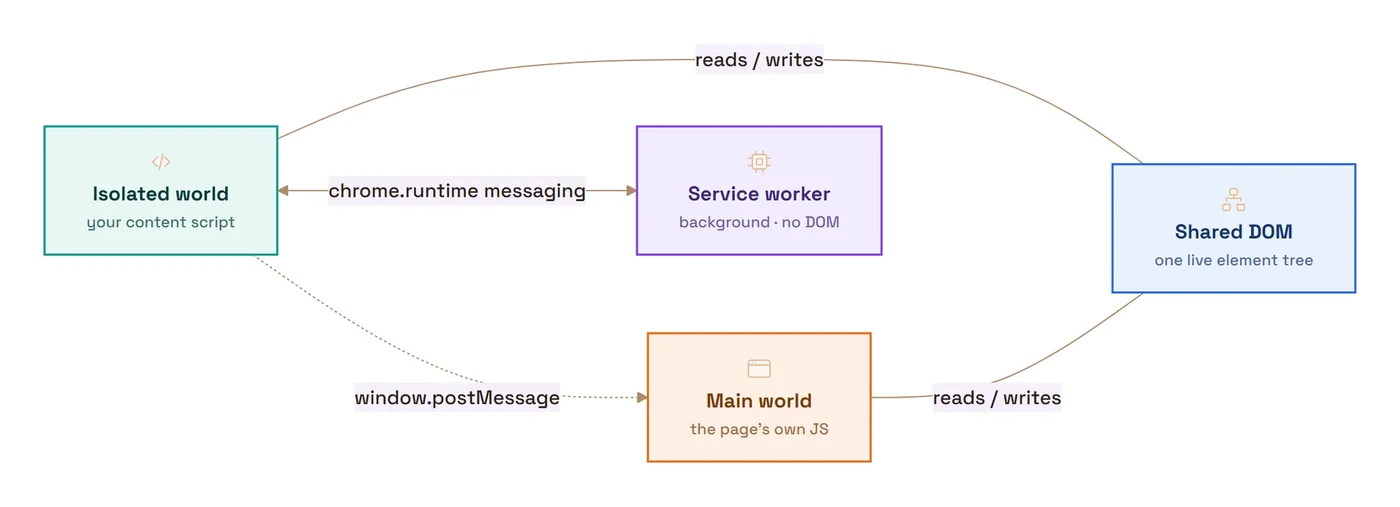
That gap is the whole game. A Chrome extension runs your code in three separate execution environments, each trading access for safety: content scripts that live inside a web page but in an isolated JavaScript world; an event-driven service worker that runs in the background with no page and no DOM; and, when you opt in, the page's main world, where your code runs next to the site's own JavaScript. Where each piece runs, what it can touch, and how the pieces talk is the mental model everything else about extensions hangs on.
Four terms recur throughout. The DOM (Document Object Model) is the browser's live, in-memory tree of a page's elements. An execution context is a self-contained JavaScript environment with its own global scope and built-ins. V8 is Chrome's JavaScript engine, and it uses isolated instances to keep one environment's objects from leaking into another. Message passing is the asynchronous mechanism extensions use to move data between these environments, because they can't call each other's functions directly.
Three environments, three sets of powers
Each environment trades that access in a different direction. A content script can read and rewrite the page's DOM but not its JavaScript variables. A service worker can call privileged chrome.* APIs but can't touch a page. Main-world code reaches the page's own JavaScript but loses the extension APIs. None of them can read another's variables directly, so they coordinate through message passing.
A short history: Manifest V1 to V3
Every extension is described by a manifest.json file, and its manifest_version key marks which platform generation it targets. Manifest V2, launched in 2012, was the standard for a decade. Manifest V3 (MV3) reached stable Chrome on January 19, 2021, and after a long, staged rollout, MV2 was disabled for every user by July 2025. It no longer runs on stable Chrome.
MV3 introduced four headline changes: service workers replaced persistent background pages; declarativeNetRequest replaced blocking webRequest; remotely-hosted code was banned (an extension may only run JavaScript shipped inside its own package); and many APIs became promise-based. The execution model below is largely the same regardless of version, but I'm describing it in its MV3 form.
chrome.tabs.executeScript is gone — the renames that date a tutorial
In execution terms, the migration was mostly a set of moves, and they're the fastest way to date any tutorial you're reading. chrome.tabs.executeScript and chrome.tabs.insertCSS became chrome.scripting.executeScript and chrome.scripting.insertCSS. The migration guide's phrasing is that executeScript() "moves from the tabs API to the scripting API", and the new namespace requires the "scripting" permission in the manifest. The old calls aren't deprecated in MV3; they don't exist, so code that uses them dies with an ordinary TypeError, because the property is simply gone from chrome.tabs.
The other renames follow the same logic. The two toolbar-button APIs, chrome.browserAction and chrome.pageAction, collapsed into a single chrome.action. And every API built on the assumption of a permanent background page was removed outright: chrome.extension.getBackgroundPage() used to hand MV2 code a live window object whose functions you could call directly, which is meaningless when the background is a worker that may not currently exist. The migration guide's replacement for all of it is blunt: other parts of the extension "can only interact with extension service workers using message passing."
Content scripts live in an isolated world
A content script is a file your extension injects into a web page so it can read and modify that page with standard web APIs. Per Chrome's docs, content scripts "can read details of the web pages the browser visits, or make changes to them." But they do it from inside a protective bubble called an isolated world.
An isolated world is a private JavaScript environment
An isolated world is a private JavaScript execution environment for a content script, one the page (and other extensions) can't reach. In Chrome's own words, "JavaScript variables in an extension's content scripts are not visible to the host page or other extensions' content scripts."
Chrome does this for security and stability. If your script declares var greeting = "hi" and the page also declares var greeting, the two must not collide. And a malicious page must never be able to reach into your script and hijack its privileged capabilities. Isolation even protects built-ins: if a page redefines window.confirm, your content script still sees the original.
Shared DOM, isolated JavaScript — the mental model that trips people up
Here's the subtle part: the DOM is shared across worlds, but JavaScript objects and scopes are not. A content script and the page manipulate the same DOM tree. Your script can add elements, read text, and attach listeners, and the page sees every change. But the two live in separate JavaScript universes and cannot see each other's variables.
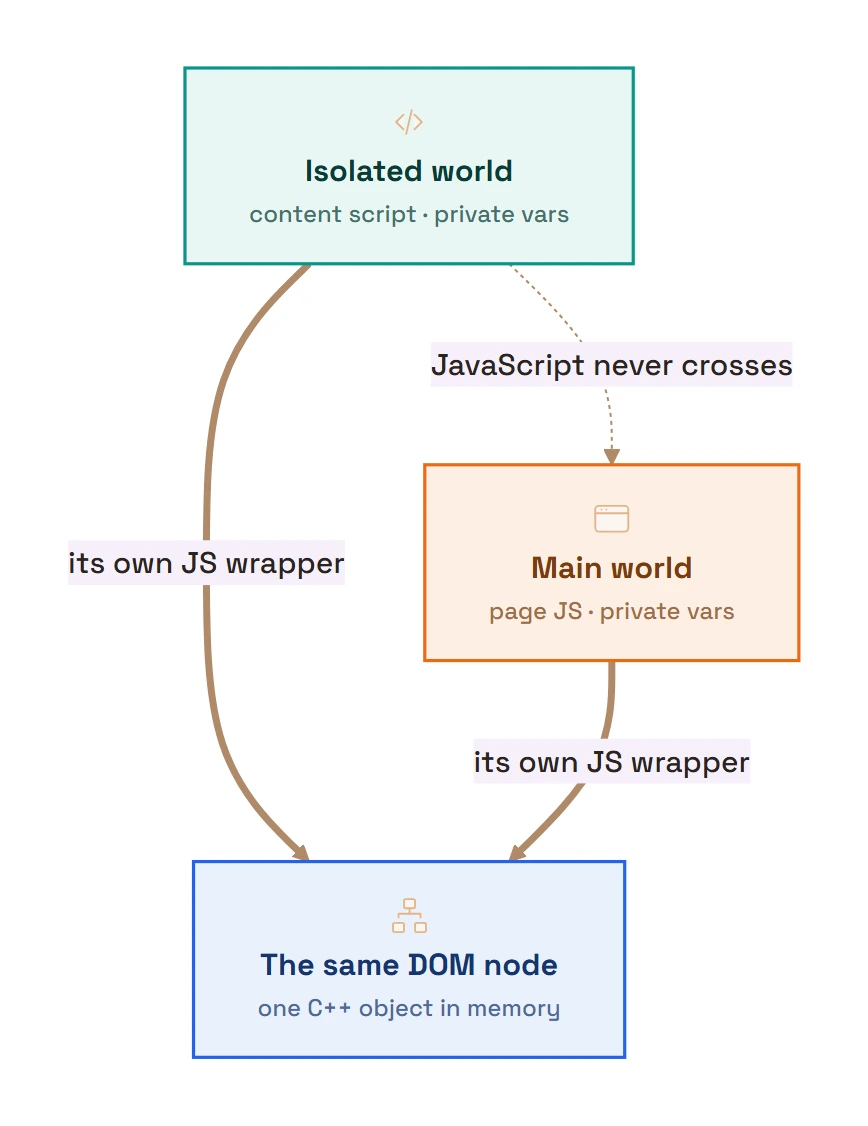
Under the hood, a single V8 isolate contains one main world and N isolated worlds. Every DOM element is a C++ object, and each world gets its own DOM wrapper: a JavaScript object pointing at the same underlying node. Both worlds reference the same paragraph element in memory, but each reaches it through its own separate wrapper.
Why chrome.tabs is undefined in a content script
Open DevTools on a page where your content script runs, type chrome., and watch the autocomplete come back nearly empty. That's not a broken manifest. A content script gets a deliberately tiny slice of the extension API, and Chrome's content-scripts reference lists the whole slice: chrome.i18n, chrome.storage, chrome.dom, and exactly seven members of chrome.runtime — connect(), getManifest(), getURL(), id, onConnect, onMessage, and sendMessage(). Everything else (chrome.tabs, chrome.windows, chrome.alarms, chrome.scripting) is undefined there, on purpose.
The reasoning is the same trust boundary as the isolated world itself. A content script executes in the renderer process that is also running the page's own untrusted code; the privileged half of the extension does not. So the powerful APIs stay in the service worker, on the far side of a process boundary, and the content script's allowance is just enough to phone home: storage, translations, and messaging. In the docs' words, content scripts "are unable to access other APIs directly. But they can access them indirectly by exchanging messages with other parts of your extension." A content script that needs tab information always uses the same relay: chrome.runtime.sendMessage() to the worker, the worker calls chrome.tabs.query(), and the answer comes back as a copy.
The odd item on the list is chrome.dom, which exists for one method: chrome.dom.openOrClosedShadowRoot() (Chrome 88+) returns a shadow root even when it was attached with mode: "closed". Page JavaScript cannot do that, because for page code a closed shadow root reads back as element.shadowRoot === null. It's one of the few places a content script is strictly more powerful than the page it's standing in.
run_at: the three moments a content script can start
The run_at key on a content_scripts manifest entry (spelled runAt in its programmatic cousin, chrome.scripting.registerContentScripts()) picks the injection moment, and the three values are more different than their names suggest. Chrome's reference defines them precisely:
document_startruns your script "after any files fromcss, but before any other DOM is constructed or any other script is run." This is the only value that beats the page's own JavaScript. It's what you need to patch a global before page code reads it, or to plant a hook the page's first script will hit. The cost: there is no DOM yet.document.bodyisnull; you can touchdocument.documentElement, register listeners, and nothing else.document_endruns your script "immediately after the DOM is complete, but before subresources like images and frames have loaded." DOM queries are safe here; anything that depends on images or iframes having arrived is not.document_idleis the default. "The browser chooses a time to inject scripts betweendocument_endand immediately after thewindow.onloadevent fires." That flexibility is the point: on a heavy page, idle injection stays out of the critical path.
The practical rule: stay on document_idle until something forces you earlier. The main-world manifest example in the next section uses "run_at": "document_start" for exactly the forcing reason, since a bridge that must exist before the page's framework boots is useless if it arrives at idle. And if a message from a content script goes unanswered right after page load, check run_at before blaming the messaging code: an idle-injected listener may simply not exist yet.
The pages where your content script will never run
Some URLs are off-limits no matter what your matches patterns claim, and Chrome has a specific sentence for each refusal. Try to inject into a chrome:// page programmatically and the call rejects with:
Cannot access a chrome:// URL
That string sits in Chromium's manifest_constants.h as kCannotAccessChromeUrl, alongside its siblings. Injecting into another extension's pages fails with "Cannot access a chrome-extension:// URL of different extension"; the same file even keeps a dedicated refusal for the New Tab Page ("The New Tab Page cannot be scripted."). And then there's the one people actually search for, because it reads like it's from another decade:
The extensions gallery cannot be scripted.
The gallery is the Chrome Web Store, old and new domains alike, and the block exists for a concrete reason. The store page carries privileged JavaScript bindings that can trigger extension installs, and the comment in Chromium's chrome_extensions_client.cc spells out the threat model: the special-casing exists "to prevent access to special JS bindings we expose to the gallery (and avoid things like extensions removing the 'report abuse' link)." An extension that could script the store could script the thing that installs extensions.
Ordinary sites you lack host permissions for produce the last pair. Without the tabs permission, the refusal names no URL: "Cannot access contents of the page. Extension manifest must request permission to access the respective host." Hold the tabs permission and the same message arrives with the URL filled in. That split is deliberate, and the source comment explains it: the URL-free variant exists because "an extension can parse error messages and determine the URLs of open tabs without having appropriate permissions to see these URLs." Chrome won't even let an error string leak what you're not entitled to know.
Two footnotes on the block list. Declaratively-matched scripts don't produce these errors, because on a restricted page they just never run, silently; the strings appear when you ask via chrome.scripting. And a development-only command-line switch, --extensions-on-chrome-urls, lifts the chrome:// restriction; it exists for people working on Chrome itself, and nothing you ship can assume it.
The main world: world: "MAIN"
Sometimes isolation is exactly what you don't want. To read a page's own globals, hook a framework's internals, or modify window in a way the page can see, you run in the main world: the execution environment shared with the host page's JavaScript.
For a long time the isolated world was all BumbleTap needed. Then I tried to type into other people's editors. Setting .value and dispatching an input event is enough for a plain <input>; on anything built with React or Draft.js — Gmail's compose box, most modern web apps — it isn't. React keeps its own shadow copy of each field's value in an internal _valueTracker on the DOM node, and if that tracker doesn't change, React decides nothing did and paints your text right back out.
The catch is that _valueTracker is a property the page's React put on the element, so from the isolated world it isn't even there. Same node, but the expando properties each world hangs on it are invisible to the other. Resetting that tracker means running in the page's own world, and the same goes for falling back to a simulated paste ClipboardEvent when execCommand gives up. So BumbleTap's text-input path is a small script injected with world: "MAIN"; the isolated content script hands it work over a scoped CustomEvent, and the main-world half does the typing where React can actually see it.
Injecting into the main world
Declaratively, the content_scripts key accepts a world property. It defaults to "ISOLATED"; set it to "MAIN":
{
  "manifest_version": 3,
  "content_scripts": [
    { "matches": ["https://*.example.com/*"], "js": ["isolated.js"] },
    {
      "matches": ["https://*.example.com/*"],
      "js": ["main-world.js"],
      "world": "MAIN",
      "run_at": "document_start"
    }
  ]
}
Programmatically, inject at runtime with chrome.scripting.executeScript, passing world: "MAIN":
chrome.scripting.executeScript({
  target: { tabId },
  world: "MAIN",
  func: () => {
    // Runs in the page's world; it can read the page's globals.
    console.log("Framework version:", window.__FRAMEWORK_VERSION__);
  }
});
What you give up in the main world
Running in the main world is powerful but risky, and the docs warn about it directly. Two concrete consequences:
- You lose the extension's protective CSP. Isolated-world scripts run under a strict Content Security Policy; in the main world, "the CSP of the page applies" instead.
- You lose the
chrome.*APIs. Main-world code is effectively page code, "not a content script… not a part of the extension anymore," sochrome.runtimeand friends are undefined. To communicate, it has to fall back towindow.postMessageor custom DOM events relayed by an isolated-world script.
Use the main world only when you genuinely need page-context access, and treat any data crossing from the page as untrusted.
The service worker: an ephemeral background brain
The third environment is the extension's background logic. In MV2 this was a persistent background page that stayed loaded for the whole session. MV3 replaced it with an extension service worker, a background script that "acts as the extension's main event handler":
{
  "manifest_version": 3,
  "background": { "service_worker": "service-worker.js", "type": "module" }
}
A service worker is event-driven, runs off the main thread, and has no associated page. The key behavioral difference: it's ephemeral. As the docs put it, service workers "stay dormant until an event they are listening for fires… execute the appropriate event listener, idle, then unload."
Why your service worker keeps getting terminated
An MV3 service worker is terminated after roughly 30 seconds of inactivity. That's the intended lifecycle, not a bug. Chrome shuts one down after 30 seconds of inactivity, when a single task takes longer than 5 minutes, or when a fetch() response takes over 30 seconds. Any event or chrome.* API call resets the idle timer.
This one bit BumbleTap's macro recorder. Recording captures each action as you click around a page, and "clicking around a page" includes long pauses. A service worker that holds the in-progress recording in a plain variable doesn't survive those pauses: thirty seconds of you reading the page, the worker unloads, and the steps you'd already captured are gone. No error. The recording just quietly resets, which is the nastiest kind of bug to chase, because nothing failed. The state simply wasn't there anymore.
The fix is the boring, correct one: write the recording state to chrome.storage.session on every change and restore it when the worker wakes back up. I reach for storage.session rather than storage.local on purpose. It survives the worker dying but clears when the browser closes, so a half-finished recording never leaks into next week's session.

That ephemerality has three hard consequences every MV3 developer has to internalize:
- No persistent in-memory global state. Any global variable is lost when the worker unloads. A
let counter = 0silently resets. Persist tochrome.storage(e.g.chrome.storage.local), which writes to disk. - Register event listeners synchronously, at the top level. Because Chrome restarts the worker to dispatch an event, listeners have to be registered the instant the script runs. Registering one inside a promise or callback "is not guaranteed to work in Manifest V3," and the event is missed.
- Don't use
setTimeout/setIntervalfor long delays. These timers are canceled when the worker terminates. Use thechrome.alarmsAPI instead.
And this one matters: a service worker has no DOM, no window, and no document. For work that genuinely needs the DOM (parsing HTML, playing audio), MV3 added the Offscreen Documents API. It also can't use localStorage, a window API. That's another reason state lives in chrome.storage.
"service worker (Inactive)" is the lifecycle working, not failing
Turn on Developer mode at chrome://extensions and every MV3 extension's card gets an Inspect views line. Most of the day, yours will read service worker (Inactive), which is Chrome's own UI wording for a view labeled "service worker" with "(Inactive)" appended while it's dormant. People search that phrase like it's an error report. It isn't. Inactive is the resting state of a healthy worker: the 30-second timer ran out and Chrome unloaded it, exactly as the lifecycle above prescribes. It will say Inactive again a minute after you fix whatever sent you looking.
The link is still useful, with one trap. Clicking it wakes the worker and attaches DevTools — and an attached DevTools pins the worker awake. Chrome's developer blog, answering "when are service workers suspended?", is explicit: after 30 seconds without events or API calls, and "never if the developer tools are open or you are using a ChromeDriver based testing library." So every state-loss bug from this section is invisible while you're watching for it. The honest test is the opposite ritual: close DevTools, wait half a minute until the card says Inactive, then use the extension. If a feature only works while DevTools is open, you've just located an in-memory state dependency.
chrome.runtime.onInstalled fires on install, not on wake-up
The lifecycle has named entry points, and mixing them up produces quiet bugs. chrome.runtime.onInstalled fires, per the reference, "when the extension is first installed, when the extension is updated to a new version, and when Chrome is updated to a new version". The event's reason field distinguishes them as "install", "update", "chrome_update", or "shared_module_update". A browser restart is none of those; that's chrome.runtime.onStartup, "fired when a profile that has this extension installed first starts up." And a service worker waking from idle — the thing that happens thousands of times across an extension's life — fires neither.
That last sentence is the trap. onInstalled looks like "my extension is starting", so people put per-session initialization in it, and it runs once at install and then never again: every subsequent wake-up gets a worker that skipped setup. The inverse mistake is worse: registering other event listeners inside the onInstalled callback. Those registrations happen once, in that first worker instance, and evaporate with it. The next wake-up re-runs only top-level code, the listeners never re-register, and the events dispatch to nobody. The rule from earlier in this section covers both: top-level code is the only code guaranteed to run on every start, so listeners go there, and onInstalled is only for genuinely once-per-version work like seeding default settings in chrome.storage or running a migration on "update".
Isolated-world content scripts, a MAIN-world bridge, and a service worker — so any keystroke can run an action on any site. It's free.
Message passing: how the worlds communicate
Because these environments each have their own isolated scope, they coordinate by passing messages: sending copies of data asynchronously rather than sharing objects.
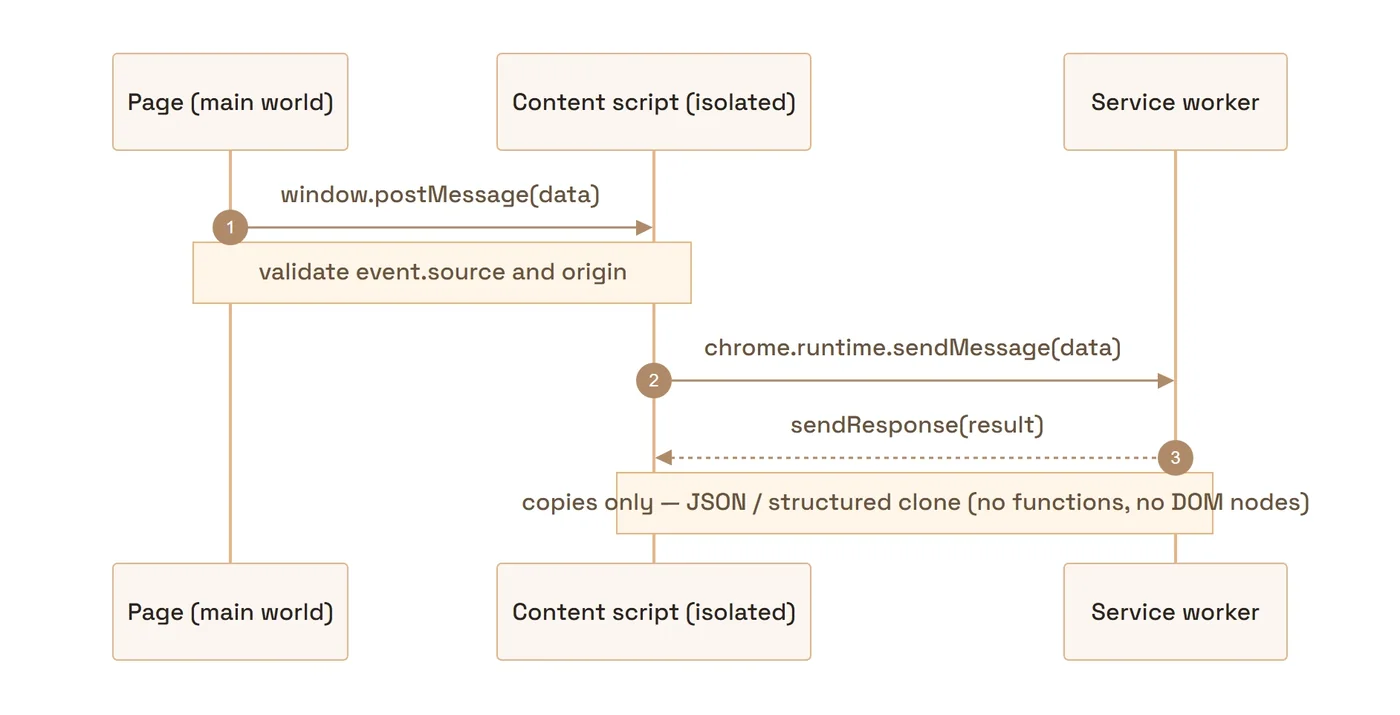
Content script ↔ service worker
For a single request-and-response, use chrome.runtime.sendMessage (from a content script) or chrome.tabs.sendMessage (from the worker to a tab), and listen with chrome.runtime.onMessage.
// service-worker.js — the top-level listener is required
chrome.runtime.onMessage.addListener((message, sender, sendResponse) => {
  if (message.type === "get-user-data") {
    fetch("https://example.com/api/user")
      .then((r) => (r.ok ? r.json() : Promise.reject(new Error(`HTTP ${r.status}`))))
      .then((data) => sendResponse(data))
      .catch((err) => sendResponse({ error: String(err) })); // else the channel hangs
    return true; // keep the channel open for the async response
  }
});
That return true is not optional: it tells Chrome the listener will call sendResponse asynchronously, which keeps the message channel open. For repeated back-and-forth, open a long-lived connection with chrome.runtime.connect, which hands each side a Port.
chrome.runtime.connect: a Port for ongoing conversations
sendMessage is a postcard; connect is a phone line. When one side has to say many things — streaming progress updates, a recorder reporting each captured step, anything chatty — opening a Port once beats paying the setup cost per message and lets either side push without being asked. The shape:
// content-script.js
const port = chrome.runtime.connect({ name: "recorder" });
port.onMessage.addListener((msg) => render(msg));
port.postMessage({ type: "start" });

// service-worker.js
chrome.runtime.onConnect.addListener((port) => {
  if (port.name !== "recorder") return;
  port.onMessage.addListener((msg) => { /* handle, port.postMessage(...) to reply */ });
  port.onDisconnect.addListener(() => { /* the other side is gone; clean up */ });
});
The name matters once an extension has more than one kind of connection: onConnect fires for every port, and the name is how you route. From the worker toward a page, the mirror-image call is chrome.tabs.connect(tabId). If the tab has multiple frames, the docs note it "invokes the runtime.onConnect event once for each frame in the tab," so a page full of iframes hands you several ports, not one.
onDisconnect is where port code earns its keep. It fires when the other end calls port.disconnect(), when the tab or frame holding the other end unloads — and when there was never anyone to talk to: connecting with no onConnect listener registered on the other side doesn't throw, it hands you a port that immediately disconnects. A port is also severed when its other end's execution context dies, which in MV3 includes the service worker unloading. So a long-lived port is long-lived only relative to sendMessage; treat onDisconnect as an ordinary event and reconnect when it fires, not as an exceptional condition.
One lifecycle subtlety worth knowing, because it changed: since Chrome 114, sending or receiving a message through a port resets the service worker's 30-second idle timer, but merely holding a port open does not. Per the lifecycle notes, "opening a port no longer resets the timers." A chatty port therefore keeps the worker alive as a side effect; a silent one lets it die mid-connection, at which point your content script's onDisconnect fires. That's the correct signal to reconnect on, and it's also the cleanest way a content script can learn its extension was reloaded out from under it, which brings us to the errors.
When messaging fails, read the string literally
Chrome's messaging errors are unusually exact. Each one names a distinct failure, and the fix is different for each. They arrive with the prefix Unchecked runtime.lastError: when nothing read chrome.runtime.lastError after a callback, or as a rejected promise without the prefix. Chromium prepends that prefix verbatim ("Unchecked runtime.lastError: ", in api_last_error.cc), so the prefix itself is only telling you no code checked for the failure. The message after it is the diagnosis. Here are the three you will actually meet.
"Could not establish connection. Receiving end does not exist."
Unchecked runtime.lastError: Could not establish connection. Receiving end does not exist.
The string lives in Chromium's message_service.cc as kReceivingEndDoesntExistError, and it means exactly what it says: the browser opened your channel, looked for a listener on the far side, and found nobody. Not "nobody answered" — nobody was there. Three situations produce it:
- You messaged a tab that has no content script.
chrome.tabs.sendMessagereaches only tabs where your script is actually running, and a manifest-declared script reaches only pages loaded after the extension arrived. Tabs that were already open at install time run nothing of yours until they reload. The same applies to URLs outside yourmatchespatterns and to the restricted pages from earlier:chrome://pages and the Web Store will never have your listener. - The listener isn't registered yet. A service worker that registers
onMessageinside anasynccallback or a.then()re-runs only its top-level code on wake-up; Chrome wakes it, dispatches the message immediately, and the listener that would have caught it doesn't exist yet. This is the concrete failure behind the register-listeners-synchronously rule. - Timing at page load. A content script injected at
document_idlecan arrive later than you expect; a message sent to the tab right after navigation commits can beat the script into the page.
The fix depends on which one it is: inject programmatically into existing tabs at install if you need them; move listener registration to the top level; and where a tab may legitimately lack the script, treat this error as an expected answer. Check chrome.runtime.lastError or catch the rejection and move on, rather than letting it spray the console.
"The message port closed before a response was received."
Unchecked runtime.lastError: The message port closed before a response was received.
Under the hood, even one-shot sendMessage opens a short-lived port, and this error means that port closed while the sender was still owed a response. A listener existed — that's the difference from the previous error — but the channel ended with no sendResponse call: the listener returned without responding and without return true, or an error path skipped the response, or the whole receiving context went away first.
There's a genuinely surprising nuance in Chromium's one_time_message_handler.cc: this error fires on the callback form only. The source comment explains that for a promise-based channel "not receiving a response is fine (assuming the listener didn't indicate it would send one)," while the callback's mere presence is read as expecting a reply, a difference kept deliberately for backwards compatibility. So chrome.runtime.sendMessage(msg, () => {}) manufactures this error whenever no listener replies, and the modern await chrome.runtime.sendMessage(msg) with no listener promising a response quietly resolves undefined. If a listener did promise by returning true and the channel still died, Chrome says so in a longer variant, from extension_message_port.cc: "A listener indicated an asynchronous response by returning true, but the message channel closed before a response was received". That one means: you said you'd answer, then the answering side vanished or forgot.
The fix is discipline on the receiving side. Every code path through the listener either calls sendResponse or doesn't claim it will, which is why the worker sample above responds in its catch too. And one deflating note: this error in a random page's console is frequently not that site's code and not yours either. Any installed extension whose content script fires a callback-form message it never gets a reply to logs the same line into whatever page it's standing in.
"Extension context invalidated."
Uncaught Error: Extension context invalidated.
This one isn't a messaging failure so much as a death notice. Reload, update, or uninstall an extension while its content scripts are running, and those scripts aren't torn down. They keep executing in every open tab, orphaned. The DOM half of their life still works: listeners fire, elements respond. But the extension they belonged to is gone, and on the next chrome.runtime call Chrome throws exactly this string (api_binding_util.cc, which checks context validity before every API call and throws "Extension context invalidated." when the check fails).
That's why it bites during development on every reload cycle: hit reload at chrome://extensions, click something in the old tab, and the still-living orphan tries to sendMessage home to an extension that no longer exists. The development fix is unexciting — reload the page after reloading the extension. The production fix is to make orphaning an event you handle: an orphaned script's open ports disconnect, so a long-lived port's onDisconnect doubles as an invalidation signal. Tear down your UI and stop calling chrome.runtime. The freshly-injected new generation of your content script takes over from there, and for anything beyond that, wrap the runtime calls that can race an update in a try/catch and fail quiet.
Isolated world ↔ main world
The isolated and main worlds can't call each other's functions, but they share the DOM, and the DOM can carry messages. The standard bridge is window.postMessage: the main-world script posts a message to its own window, and the content script listens on window and relays it onward.
// content-script.js (isolated world) — relay to the service worker
window.addEventListener("message", (event) => {
  if (event.source !== window) return;          // only our own window
  if (event.data?.type === "FROM_PAGE") {
    chrome.runtime.sendMessage({ payload: event.data.text });
  }
});
One security caution here: always validate event.source, and ideally event.origin too. This bridge is a documented attack surface. A wildcard matches pattern plus a naïve postMessage relay can let any web page reach your privileged service worker. Treat page-origin messages as untrusted input.
I'll be straight about how BumbleTap handles this: it never opens a window.postMessage line to the service worker in the first place. That relay is the documented soft spot. The page can post to window too, so a naïve listener hands every script on the page a pipe straight to your privileged worker. BumbleTap's worlds talk over narrower channels instead. The isolated-to-main bridge is a namespaced CustomEvent, and the code-executor world and the content script pass data through prefixed DOM attributes (data-qk-run-* / data-qk-res-*) they both agree on. Neither one is a general inbox the whole page can shout into. Source and origin checks aren't wrong, but the safest relay is the one you never expose.
What can you pass? Structured-clone limits
Messages aren't shared by reference; they're copied, and the two mechanisms differ. chrome.runtime messaging serializes to JSON, which silently drops functions and Symbols and throws on circular references. window.postMessage uses the structured-clone algorithm, which is more capable: it preserves circular references and supports Map/Set, but throws a DataCloneError on functions and DOM nodes. Under either one, a class instance survives only as a plain object, its prototype lost. Stick to plain data: objects, arrays, strings, numbers, booleans, plus Map/Set over postMessage.
Two ways to inject a content script
There are two injection models; pick by predictability.
Declarative (content_scripts) |
Programmatic (chrome.scripting) |
|
|---|---|---|
| Best when | You know the pages in advance | You decide at runtime |
| Declared in | manifest.json, statically |
Called from the service worker |
| Permissions | matches host patterns |
"scripting" + host, or activeTab |
| Timing | run_at: start / end / idle |
On demand |
| World | ISOLATED or MAIN |
ISOLATED or MAIN |
With programmatic injection, note that the injected func is "serialized, then deserialized for injection." Any bound parameters and closure are lost, so pass data only through args, and those args must be JSON-serializable.
chrome.scripting.executeScript: the full contract
The serialization rule above is half the contract; here's the rest of it, because the questions people actually have about executeScript all have exact answers: how do I pass parameters, what comes back, is it async.
In: either files (paths inside your package, because MV3 bans remote code) or a func plus args. The args array maps positionally onto func's parameters, and since the function is serialized, args is the only channel in, so a variable captured from the surrounding scope reads as undefined on the other side, with no warning.
Out: the call returns a promise that resolves to an array of results, one per frame it injected into, and each entry carries the frameId, a documentId (Chrome 106+), and result, the value of the last statement of your files script or the return value of func. Injecting only into the top frame still gets you an array of one; allFrames: true gets you one entry per frame, and the frame IDs are how you tell them apart. And the async question has a better answer than most people expect: per the reference, "If the script evaluates to a promise, the browser will wait for the promise to settle and return the resulting value." So func can be an async function and you await the real value, with no manual polling and no message passing for a one-shot read.
const [{ result }] = await chrome.scripting.executeScript({
  target: { tabId },
  func: async (selector) => {
    const el = document.querySelector(selector);
    return el ? el.textContent.trim() : null;
  },
  args: ["h1"],        // positional, JSON-serializable
});When: by default, programmatic injection doesn't race the page, since the script lands at document_idle, or right away if the page already finished loading. If you need it earlier, injectImmediately: true (Chrome 102+) triggers the injection "as soon as possible," though the reference is careful to add this "is not a guarantee that injection will occur prior to page load, as the page may have already loaded by the time the script reaches the target." It's the programmatic cousin of run_at: document_start, minus the certainty, which is why a script that must provably beat page code still belongs in the manifest.
And the failure mode ties back to the restricted-pages list. Call executeScript on a chrome:// tab or the Web Store and the promise rejects with those exact strings: "Cannot access a chrome:// URL", "The extensions gallery cannot be scripted." A surprising number of "my extension randomly doesn't work" reports are just this: the active tab happened to be a new tab page, a settings page, or the store, where no content script is allowed to exist.
What I'd actually do
Five rules I hold to after shipping on this architecture:
- Default to the isolated world. Build every content script there first, and escalate to
world: "MAIN"only once you've confirmed the data you need is not reachable from the DOM alone. - Treat the service worker as stateless. Assume it can die between any two events: write state to
chrome.storageimmediately, register all listeners at the top level, and replace timers withchrome.alarms. Test it by manually stopping the worker inchrome://serviceworker-internals. If a feature breaks, it had a hidden state dependency. - Pick the injection model by predictability. Known URL set means declarative. Runtime decisions or
activeTab-gated actions mean programmatic. - Harden every message boundary. In any
postMessagerelay, validateevent.source === windowand checkevent.origin, and never use a wildcardmatchesfor a script that forwards page messages to the worker. Send only plain, JSON-serializable data. - Build MV3-native. If a tutorial shows
"manifest_version": 2, persistent background pages, orchrome.tabs.executeScript, it's outdated. MV2 no longer runs on stable Chrome.
Caveats
- Lifecycle timing has shifted before. The old five-minute cap on a worker's total lifetime was removed in Chrome 110, which is a different limit from the five minutes a single request still gets; WebSocket keep-alives arrived in Chrome 116. Confirm exact behavior against the current Chrome for Developers docs for the version you target.
world: "MAIN"started in Chromium but is now cross-browser. Firefox 128 (July 2024) added theworldfield to both thecontent_scriptsmanifest key andchrome.scripting.executeScript; earlier Firefox ignores it and runs the script in the isolated world regardless. Gate any fallback on the browser version (pre-128 Firefox), not on Firefox as a whole.- The security example is illustrative. The
postMessage-relay attack class is well documented, but audit your own extension rather than assuming any single published case matches your code. - The error strings quoted here are reproduced from Chromium's source as of August 2026 (
manifest_constants.h,message_service.cc,one_time_message_handler.cc,extension_message_port.cc, andapi_last_error.cc). They've been stable for years, but they're implementation text, not API: if you match on them in code, match substrings, and don't be surprised if a future Chrome rewords one. - The content-script API allowlist grows occasionally (
chrome.domis younger than the rest of the list). Check the current content-scripts reference before assuming something is still excluded.
Frequently asked questions
Can content scripts access page variables?
window.foo, inject into the main world with world: "MAIN", or bridge via window.postMessage.What is the difference between the isolated world and the main world?
chrome.* APIs and runs under the page's CSP. Both worlds share the same DOM.Why does my service worker keep getting terminated?
fetch() takes over 30 seconds. Events and chrome.* API calls reset the idle timer. Don't fight it — persist state to chrome.storage, register listeners at the top level, and use chrome.alarms for delays.Can a service worker access the DOM?
window, no document, and no DOM, and they run off the main thread. For DOM-dependent work, use a content script (which has the page's DOM) or the Offscreen Documents API.How do I inject a script into the page's main world?
"world": "MAIN" on a content_scripts entry in the manifest, or call chrome.scripting.executeScript with world: "MAIN" at runtime. Remember that main-world code cannot use chrome.* APIs and must relay data to your extension via window.postMessage or custom DOM events.Do I have to use message passing, or can the worlds share objects?
chrome.runtime messaging, or the structured-clone algorithm for postMessage. Functions and DOM nodes can't be sent either way; circular references throw under JSON but survive structured clone.How do I fix 'Could not establish connection. Receiving end does not exist'?
chrome.tabs.sendMessage to a tab that has no content script (the page was open before the extension was installed, the URL isn't in matches, or it's a restricted page like chrome:// or the Web Store), or an onMessage listener registered asynchronously in a service worker, so a freshly-woken worker misses the message. Register listeners at the top level, and treat the error as expected on tabs that legitimately have no script.What does 'The message port closed before a response was received' mean?
sendResponse. Typically a listener forgot to respond on some code path, or forgot to return true for an async response. The promise form (await chrome.runtime.sendMessage(...)) treats a missing response as fine unless a listener explicitly promised one, so modernizing the call often makes the error disappear.What does 'Extension context invalidated' mean?
chrome.runtime call throws this error. During development, reload the page after reloading the extension. In production, listen for a port's onDisconnect and shut the orphan down cleanly.Why does my Chrome extension's service worker go inactive?
chrome://extensions then shows "service worker (Inactive)" under Inspect views. It isn't an error — the worker restarts on the next event. If your extension breaks when the worker goes inactive, it was holding state in memory instead of chrome.storage.What does run_at do in a content script?
document_start runs after CSS but before the DOM is constructed or any page script runs; document_end runs right after the DOM is complete but before images and frames finish; document_idle (the default) lets the browser pick a moment between document_end and just after window.onload. Use document_start only when you must beat the page's own scripts — at that point document.body doesn't exist yet.How do I pass arguments to chrome.scripting.executeScript?
args array, which is matched positionally to the parameters of func — and the values must be JSON-serializable. Nothing else crosses: the function is serialized and deserialized for injection, so closures and bound variables are silently lost. Return values come back per frame in the resolved array's result fields, and if func returns a promise, Chrome waits for it to settle first.When does chrome.runtime.onInstalled fire?
reason field says which. It does not fire when the service worker wakes back up, which happens constantly, and it does not fire when the browser restarts (that's onStartup). Don't use it for per-session setup, and never register event listeners inside it.Founder, BumbleTap
Interested in a little of everything. BumbleTap is what happened when he got tired of repeating the same browser clicks and built his own fix.