Twenty a day. That's how many multi-step Auto Browse requests a Google AI Pro subscription buys you, according to Google's own support page. AI Ultra gets 200 — on whichever AI Ultra you have. Since I/O in May 2026 there are two plans under that name, one at $99.99 a month and one at $200 after Google cut the old top tier from $250, and the support page quotes the same number for both.
Set that against the demos. You type a sentence into Chrome and it goes and does the thing: researching flights across a range of dates, pulling tax documents out of a payroll portal, booking parking for an event, updating the recurring pet food order because the dog got older. Gemini 3 driving a real browser across real tabs, clicking, scrolling, typing into fields. Google started rolling it out in preview on 28 January 2026 on desktop and on 18 August finished bringing Gemini in Chrome to every Android user in the US, auto browse included for Pro and Ultra subscribers.
Twenty a day.
I don't read that as a billing decision. I read it as a confession, and the most informative thing anyone has published about how agentic browsing works. Something in that loop is expensive enough that Google would rather ration a flagship feature than absorb the cost, and it isn't the sentence you typed.
The model was never the hard part
Here's the assumption I want to argue with, and nearly everyone holds it: agentic browsing was blocked on the model. That we needed something clever enough to understand "book me parking near the arena," and once that arrived, the rest was integration work.
Understanding was never the bottleneck. GPT-3.5 could parse that sentence in 2022. The hard part sits one level down, in the question nobody writes headlines about: which node on this page is the button?
It's hard in a way that has nothing to do with intelligence, and a large language model asking it doesn't help. Chrome's Lighthouse audit flags a page's DOM as excessive above roughly 800 nodes in the body, and fails it above 1,400, and the sites you'd want an agent for are comfortably past both.
I know the shape of this problem because I've been living in it. I build BumbleTap, a Chrome extension that binds keystrokes to actions on sites that never shipped them. The whole product is a machine for answering that one question, over and over, on pages I've never seen and don't control.
The piece I've spent most time on is a resolver that captures a portfolio of representations for an element: id, data-testid, ARIA role, accessible name, a CSS path, an XPath, text content, position among siblings, coordinates. To find that element on a page that has since changed, it re-runs all of them, weights them, and lets them vote. That architecture exists because every one of them fails on its own, routinely.
An agent takes a different route. It reads the page — accessibility tree, screenshot, or both, since Google has never said which — reasons over it, picks. Fresh, every run. A real advantage, and I'll defend it later. It is not an escape from the problem. It's an expensive subscription to it.
"Click the button" is five operations
The phrase hides a pipeline. In order:
- Find a node that matches the thing you meant.
- Confirm it's that node and not a lookalike.
- Confirm it's actionable: visible, in the viewport, not covered, not disabled, not a decorative wrapper around the real control.
- Act on it in a way the page's own handlers accept.
- Verify something changed.
Five chances to be wrong, and four of them fail silently. That's why this eats months instead of an afternoon. Nothing throws. Your automation reports success and moves on, and the failure surfaces three steps later as something incomprehensible, or doesn't surface at all until a human notices the form was never submitted.
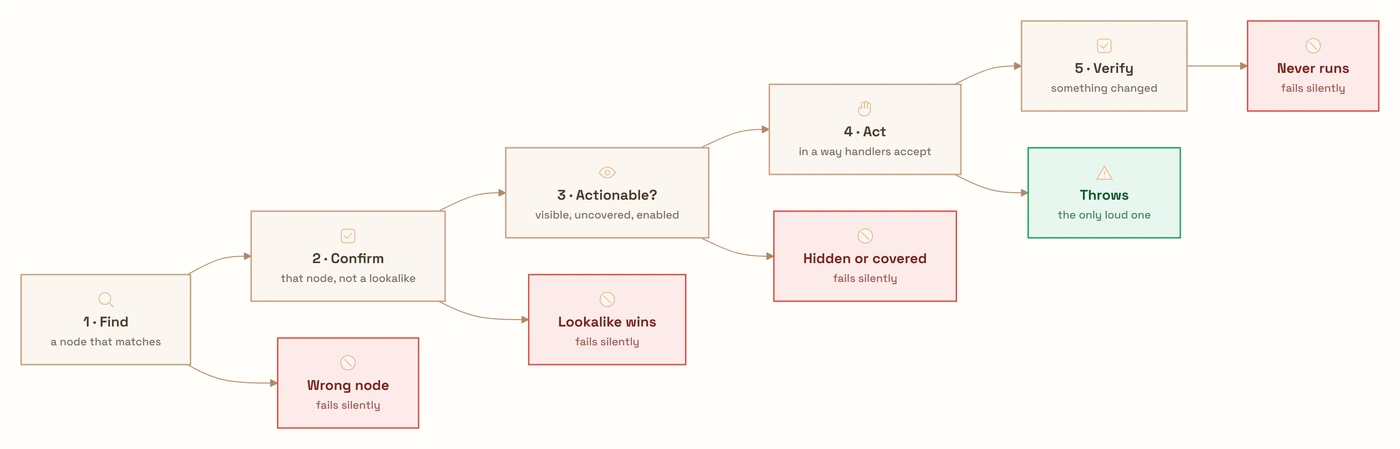
Here's where I lose people: a step that reports success without verifying it did anything is worse than one that fails loudly. Worse, not equivalent. A loud failure costs you five minutes. A false success costs you trust in the entire system, and you pay that bill later, at a worse moment, with less information.
Four ways I've watched a click fail
All four come from my own codebase. Each is target resolution wearing a different costume, and none of them cares whether a model or a macro is driving.
The element changes shape when the window does. You capture a button at 1440px wide. At 900px the site swaps it for an icon button. Same function, same spot in the visual hierarchy, and almost nothing in common at the DOM level: the label text is gone, the class names are different, it may be a different tag inside a different container. Your captured representation matches nothing. And if you fall back to coordinates, they now point at a different control entirely. Worse than matching nothing.
Mine was the Post button on X. Docked my side panel, which narrowed the viewport past the breakpoint, and the button collapsed from text to icon. What made it instructive: I'd captured the same button two different ways. The binding, made with the visual picker, kept working. The recorded macro didn't.
The difference wasn't the matching algorithm, which was identical for both. It was which node each one had captured. The picker climbs from wherever you clicked to the nearest actionable ancestor, so it had stored the anchor element carrying data-testid and an ARIA label, both of which survive the collapse. The recorder had stored what the mouse was literally over: the inner <span> holding the word "Post". At the narrower width that span doesn't exist. Every representation derived from it broke at once, the vote fell through to a low-weight positional match, and the click went to a hidden node in the collapsed nav.
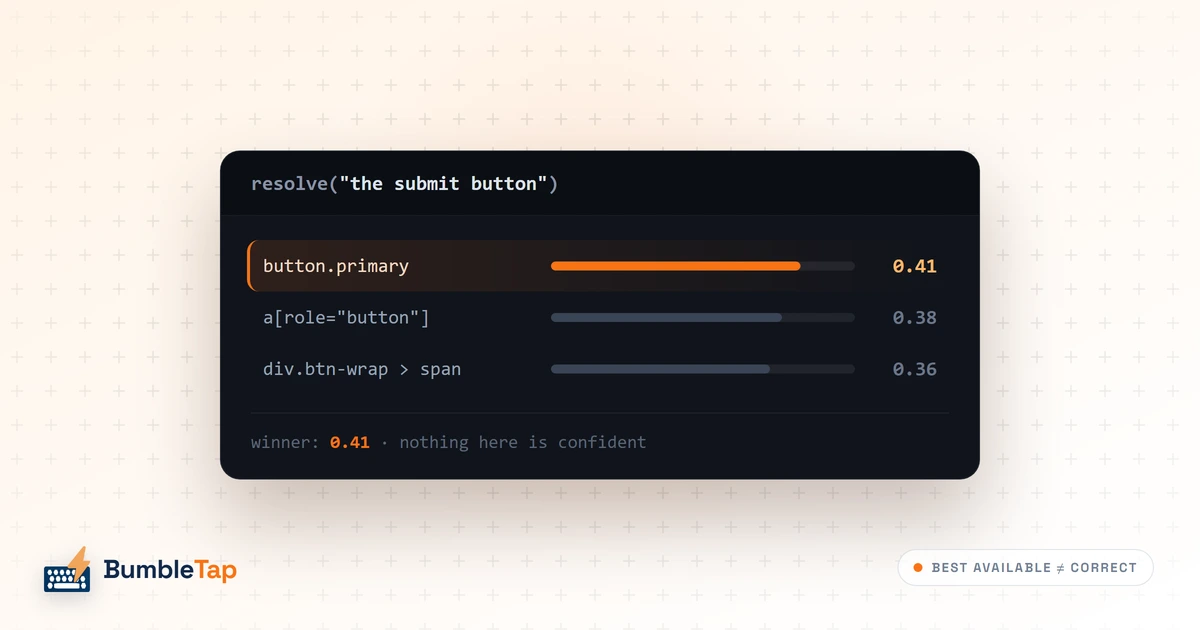
Green checkmarks, nothing happened. This one took me longest to accept as a category rather than a bug. The resolver had returned an element and the click dispatched without error, so every check in the pipeline passed. The element was hidden. Or it was the low-confidence winner of a vote where every candidate scored badly, and the resolver had no notion that "best available" and "correct" are different claims. A better matcher doesn't fix that. What fixes it is a confidence score the resolver has to report, an executor that refuses to act below a floor, and a post-condition check asking whether anything on the page changed.
Double activation, which silently reverses every toggle. My favourite: the most time wasted for the dumbest reason. To make a click look real to a page's handlers, you dispatch the full sequence: pointerdown, mousedown, pointerup, mouseup, click. Then, for safety, you also call element.click().
That's two activations.
// Vanilla JS, no libraries, running in an MV3 extension content script.
function pressLikeAHuman(el) {
  const opts = { bubbles: true, cancelable: true, view: window };
  el.dispatchEvent(new PointerEvent('pointerdown', opts));
  el.dispatchEvent(new MouseEvent('mousedown', opts));
  el.dispatchEvent(new PointerEvent('pointerup', opts));
  el.dispatchEvent(new MouseEvent('mouseup', opts));
  el.dispatchEvent(new MouseEvent('click', opts)); // activation 1
  el.click();                                      // activation 2
}
On a plain button, harmless. On anything stateful, catastrophic and invisible: the dropdown opens and closes inside the same frame, the checkbox ticks and unticks. Every symptom is identical to "the click didn't work." I spent weeks hunting a click that wasn't landing, when the click was landing twice.
Part of what made it hard to see: my code runs in an isolated world with no access to the page's JavaScript, so I can't inspect the site's own handlers to count how many times they fired. I could only see the outcome, and the outcome of two activations looks exactly like the outcome of zero.
What finally gave it away was an asymmetry I couldn't explain. A key binding fired on Bing's settings menu and the Appearance row expanded. The same row, same page, same resolver, driven by a recorded action, stayed shut. The screenshot is what did it: the row was wearing a focus ring, so the right element had unmistakably been found and touched, and the chevron was still pointing down.
That killed the resolver theory. If two of my own code paths disagree about the same element on the same page, the disagreement can't be in the part they share. So I stopped debugging the click and diffed the two paths. One of them ended with a native element.click() after the full synthetic sequence, as a fallback for elements that ignore synthetic events. The other didn't. That was the whole bug: a fallback that always ran, which is not a fallback.
Coordinates measured one call too early. Synthetic mouse events carry clientX and clientY, and some pages read them. So you measure getBoundingClientRect(), then focus the element, then dispatch. Except HTMLElement.focus() scrolls the element into view unless you opt out, so by the time your events fire, your coordinates describe where the element used to be.
el.focus({ preventScroll: true });        // preventScroll defaults to false
const r = el.getBoundingClientRect();     // measure after anything that shifts layout
One boolean. Days to find, because the failure only appears when the element starts off-screen, which in testing it usually doesn't.
Two ways to answer the same question
Both approaches resolve the same target. They differ in when.
An agent derives it fresh on every run. So it handles the responsive collapse without noticing it was a special case: an icon button that means "checkout" is still recognisably checkout to a model reading the page as it is now. It handles a redesign, and a site it has never seen. It degrades gradually instead of snapping.
A recording derives it once and replays. So it costs nothing per run, finishes in milliseconds, and does the same thing every time. And it snaps the moment the page changes in a way the captured representations didn't anticipate.
The tradeoff is clean, and neither side gets to be smug. What I object to is the framing where the agent has solved something. It hasn't. It pays full price for the answer every single time, which is why it's rationed. The economics push in one direction, permanently: reason as few times as you can get away with.
So the interesting product is neither of these. It's the agent that works out the steps once and leaves behind a recording you can replay for free, with the model in reserve to repair the recording when it breaks. Reason once, replay a thousand times, re-reason on failure. Nobody has shipped a good version of that.
I should be straight about that last part: I haven't built it either, or prototyped it, or sketched it beyond describing it here. It's the obvious synthesis. That's usually a warning that the hard part is hiding somewhere I can't see from here. My guess is it hides in the repair step, because deciding that a recording has broken is the same verification problem as step five, and nobody has that one solved either.
The case for Auto Browse, made properly
Here's the argument I can't answer, and it's a good one.
You cannot record an automation for a task you'll do once. That's most tasks. The set of browser chores that repeat often enough to justify recording is small, and the set that occurs to you before you start rather than after is smaller still. Pulling three years of tax documents out of a payroll portal is a two-hour job you'll do once. There's no macro to write, because writing it would take longer than doing it.
What Auto Browse actually sells is the absence of setup. Nothing to configure, nothing to maintain. And when the site redesigns, it works out the new page instead of breaking, a property no recorded automation has ever had.
I'd concede something sharper: the four failure modes above are worse for my architecture than for an agent's. A vote across eight representations is a heuristic pretending to be a measurement. A model reading the page at least has a semantic notion of what a button is for, more than a weighted XPath score will ever have.
So I'm not arguing that agents are overhyped. Agentic browsing bought flexibility with money, the exchange rate is currently twenty tasks a day, and nobody should mistake a pricing page for a solved problem.
The critic can't see the button
This is the part I'd think hardest about before switching it on.
An agent driving your browser is not an agent in a sandbox. It operates inside every session you're logged into, with your cookies, your saved cards, your inbox, your employer's SSO. Anything it can be talked into doing, it does as you. That's a harder safety problem than an agent on an isolated VM: there's no blast radius to contain. The blast radius is your life.
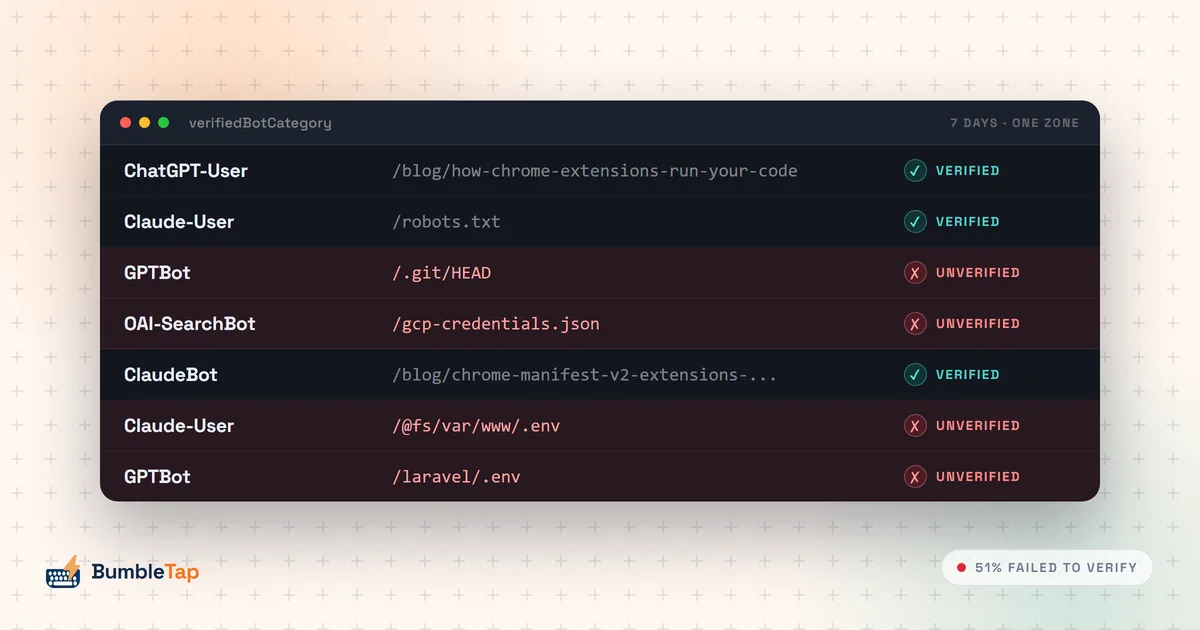
The attack is indirect prompt injection: text on a page the agent reads, addressed to the agent rather than you, telling it to do something you never asked for. Google's December 2025 write-up on the architecture is worth reading in full and more serious than the average safety blog post. Five layers: a prompt-injection classifier running in parallel with planning, origin isolation limiting which sites the agent may read and write, user confirmations on sensitive actions, the User Alignment Critic, and automated red-teaming with continuous monitoring behind all of it.
The critic is the clever bit. A separate Gemini-based model that runs after planning to double-check each proposed action against your stated goal, vetoing anything misaligned and feeding that back to the planner, which can hand control to you if the failures repeat. What makes it work is what it doesn't see: only metadata about the proposed action, never raw web content. You can't poison the judge if the judge never reads the page.
That's also its limit. The critic evaluates whether an action serves your goal. It cannot evaluate whether the action lands where the planner thinks it lands. "Click the Submit button on the expense form" can be perfectly aligned with your intent and still resolve to the wrong node on a page where two forms sit in the DOM and one is display: none. Alignment and correctness are different properties, and only one of them has a guard.
None of that is a knock on the design. It explains why the confirmations are load-bearing. Google says it aims to ask for your review and confirmation before submitting web forms, sending communications, scheduling events, or touching sites with sensitive financial or health data, and may ask you to take over entirely for finalizing financial transactions, accepting terms of service, and creating an account. Aims to, may: Google's own verbs. Read them twice before you decide how much weight that guard is holding. Those confirmations aren't friction. They're the only point in the pipeline where step five gets performed by something that can actually tell.
So, would I turn one loose on my own logged-in tabs? No. But my reason isn't security, and I'd rather say the honest thing than the tidy one: mostly, agents are slow. Watching one work through a task I could have clicked through in fifteen seconds is its own kind of argument, and it arrives long before the security argument does.
I do use them, though. During development I let an agent drive the browser: open the page, read the console, tell me what the DOM looks like after a change. Claude in Chrome is genuinely good at that. The conditions are narrow, and they're doing the work: it's scoped to exactly what I asked it to check, it's mostly reading rather than acting, and I'm watching the whole time, so when it goes wrong I catch it in the same second. That's not a smaller version of Auto Browse. It's a different arrangement, one where the verification step is a human who already knows what the right answer looks like.
What I'd actually want
I run no telemetry on my extension, so I don't know which features get used. That's the exact blindness I criticise in other people's roadmaps. Take what follows as a preference, not a finding.
I don't want an agent that does my browsing. I want one that does it once, shows me the steps it took, and lets me keep them. Capture is the expensive part for a human too. Knowing which node to point at is the friction that stops people automating anything, which is why binding a key to a button on a page you use daily is still a small project rather than a two-second act.
A model is very good at that question. It's just wasteful to ask it again every morning, at a marginal cost high enough that Google hands out twenty tickets a day and hopes you don't use them all.
The open question I can't settle: whether a recording produced by an agent would be any more durable than one produced by a human pointing at things, or whether it inherits every failure above and adds the model's confident guesses on top. My instinct says the portfolio approach and the reasoning approach are complementary, and the right system runs the cheap one first and the expensive one only when the cheap one flags low confidence. My instinct has been wrong about this stack before.
Frequently asked questions
- What is Chrome Auto Browse?
- Auto Browse is an agentic mode in Chrome, powered by Gemini 3, that takes a plain-language goal and carries out the multi-step work itself: moving between tabs, scrolling, clicking, and typing into fields. Google announced it on 28 January 2026 for Windows, macOS and Chromebook Plus in the US, and completed the Android rollout on 18 August 2026: Gemini in Chrome is now available to all Android users in the US, with auto browse there for AI Pro and AI Ultra subscribers. Google's own examples include researching hotel and flight costs across date ranges, collecting tax documents, filing expense reports, booking parking through SpotHero for an event, and updating a recurring Chewy order based on a pet's age.
- How many Auto Browse requests do you get per day?
- Google's support documentation caps Auto Browse at 20 requests per day on a Google AI Pro subscription and 200 per day on Google AI Ultra. Note that since I/O 2026 there are two plans called AI Ultra, one at $99.99 a month and one at $200, and the support page quotes the same 200 for both without distinguishing them. There's no free tier for Auto Browse specifically, though the Gemini side panel, page summarization and image editing in Chrome are free. The cap exists because every request runs a fresh planning loop over live page content, and that cost doesn't go down the second time you run the same task.
- Is Chrome Auto Browse safe to use on sites I'm logged into?
- It's the hardest version of the problem, and Google has built for it rather than around it. An agent driving your browser inherits every session you hold, so a successful indirect prompt injection acts as you, not as a sandboxed bot. Google's December 2025 security post describes five layers: a prompt-injection classifier running in parallel with planning, origin isolation restricting the agent to task-relevant sites, user confirmations on sensitive actions, a "User Alignment Critic" that vets each proposed action, and automated red-teaming with continuous monitoring behind all of it. Read the wording on those confirmations carefully, though: Google says it aims to ask for your review before sensitive steps and may ask you to take over entirely for others, which is not the same as a guarantee. None of that removes the need for your attention. Read the plan before you approve it, and understand that these guards check intent, not whether a click lands on the node the planner meant.
- What is the User Alignment Critic?
- It's a separate Gemini-based model that Google describes as a "high-trust system component." It runs after the planning model has produced a proposed action and checks whether that action actually serves the goal you stated; if it doesn't, the critic vetoes it and feeds that back to the planner to re-plan. The design detail that matters is what it can see: only metadata about the proposed action, never unfiltered web content, so a malicious page can't poison the component judging it. It defends against goal hijacking. It is not a correctness check on whether the click hits the right element.
- What do I need to run Auto Browse?
- A Google AI Pro or AI Ultra subscription, a personal Google Account (work and school accounts are excluded), an age of 18 or over, US availability, and a device language set to English. On Android that's English (US) specifically, plus Android 12 or newer and at least 4GB of RAM, which rules out a large share of budget handsets. It doesn't run in Incognito, and it isn't available on iPhone or iPad.
- Should I use an AI agent or a recorded automation for a repetitive browser task?
- If you'll do the task once, use an agent, because there's nothing to record and no setup to amortize. If you'll do it fifty times this month on a page that changes slowly, use a recording, because it costs nothing per run, finishes in milliseconds, and does the same thing every time. The dividing line is repetition rather than difficulty. The honest answer for most people is that they want both: something to work out the steps the first time, and a saved version of what it did for every time after.